>>> items = [111, 222, 333]
>>> items
[111, 222, 333]
Create a new list or copy an existing one with the list constructor:
>>> trees1 = list(['oak', 'pine', 'sycamore'])
>>> trees1
['oak', 'pine', 'sycamore']
>>> trees2 = list(trees1)
>>> trees2
['oak', 'pine', 'sycamore']
>>> trees1 is trees2
False
To create a tuple, use commas, and possibly parentheses as well:
>>> a = (11, 22, 33, )
>>> b = 'aa', 'bb'
>>> c = 123,
>>> a
(11, 22, 33)
>>> b
('aa', 'bb')
>>> c
(123,)
>>> type(c)
<type 'tuple'>
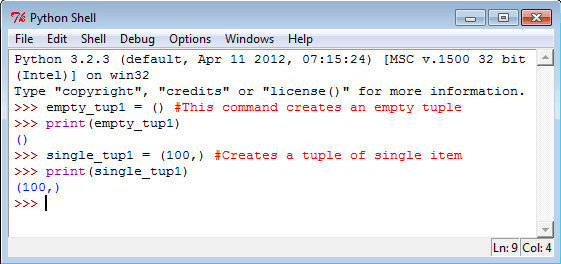
● To create a tuple containing a single item, we still need the comma. Example:
>>> print ('abc',)
('abc',)
>>> type(('abc',))
<type 'tuple'>
To add an item to the end of a list, use append():
>>> items.append(444)
>>> items
[111, 222, 333, 444]
To insert an item into a list, use insert(). This example inserts an item at the
beginning of a list:
>>> items.insert(0, 1)
>>> items
[1,
111, 222, 333, 444]
To add two lists together, creating a new list, use the + operator. To add the items in one
list to an existing list, use the extend() method. Examples:
>>> a = [11, 22, 33,]
>>> b = [44, 55]
>>> c = a + b
>>> c
[11, 22, 33, 44, 55]
>>> a
[11, 22, 33]
>>> b
[44, 55]
>>> a.extend(b)
>>> a
[11, 22, 33, 44, 55]
You can also push items onto the right end of a list and pop items off the right end of a
list with append() and pop(). This enables us to use a list as a stacklike
data
structure. Example:
>>> items = [111, 222, 333, 444,]
>>> items
[111, 222, 333, 444]
>>> items.append(555)
>>> items
[111, 222, 333, 444, 555]
>>> items.pop()
555
>>> items
[111, 222, 333, 444]
And, you can iterate over the items in a list or tuple (or other collection, for that matter)
with the for: statement:
>>> for item in items:
... print 'item:', item
...
item: 1
item: 111
item: 222
item: 333
item: 444
"News powered by"


No comments:
Post a Comment